Simplified Chinese editor UI (Beta) | 简体中文界面 Beta
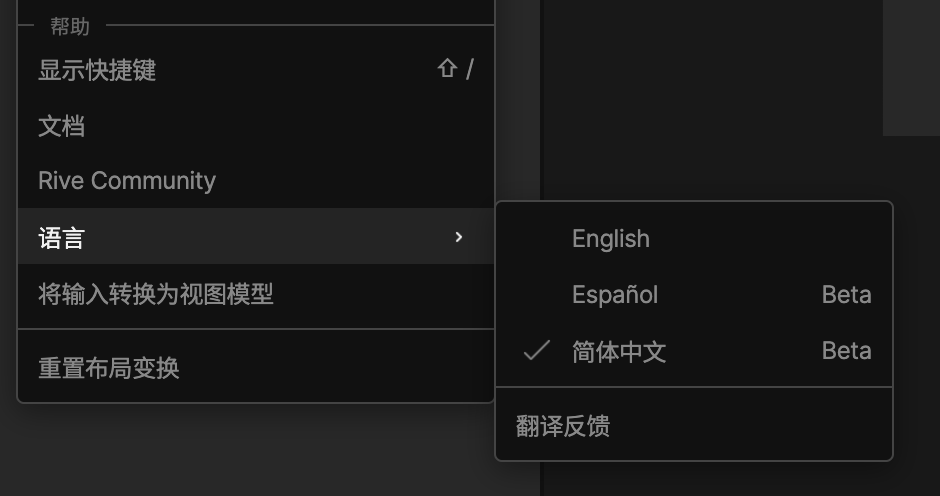
The Rive Editor is now available in Simplified Chinese, in Beta.
To switch: open the main menu at the top left of the Editor (or the account menu in the file browser), then Language > 简体中文.
It's early. The UI text is machine translated and checked against a glossary, but no native speaker has reviewed it yet, so expect some wrong terms, awkward phrasing, clipped labels or missing characters.
New objects keep English default names (Artboard 1, State Machine 1) because runtimes look them up by name.
Reply here, in Chinese or English, with:
strings that are wrong or read badly (a screenshot helps)
terms you'd rather see
clipped text or characters that don't display
Translation Feedback, at the bottom of the Language menu, brings you back here.
Rive 编辑器现已支持简体中文界面(Beta)。
切换方法:打开编辑器左上角的主菜单(或文件浏览器里的账户菜单),选择「语言」>「简体中文」。
这是早期版本。界面文字由机器翻译,并对照术语表校对过,但还没有经过中文母语者审校,可能会有不准确的术语、别扭的表达、被截断的文字或无法显示的字符。
新建对象的默认名称(如 Artboard 1、State Machine 1)保持英文,因为各平台的 Runtime 通过名称查找它们。
欢迎在本帖回复:
翻译不准确或读起来别扭的地方(附截图更好)
你更习惯的术语
文字被截断或显示不正常的地方
「语言」菜单底部的「翻译反馈」会带你回到这里。